
The Purchase Wallet is an add-on feature that allows administrators to view wallet activities related specifically to purchase transactions. Unlike the regular E-Wallet, which records all wallet-related credits and debits, the Purchase Wallet focuses exclusively on transactions associated with purchases made within the system.
This feature helps administrators monitor purchase-related fund movements, verify wallet usage for purchases, and review transaction details for individual users.
Purpose
Use the Purchase Wallet page to:
- Track purchase-related wallet transactions
- Monitor funds used for purchases
- Review purchase wallet activity for specific users
- Verify purchase-related financial records
- Separate purchase transactions from regular wallet activities
Steps to View the Purchase Wallet Details of a User
Step 1: Open the E-Wallet Module
From the left-side navigation menu, click E-Wallet.
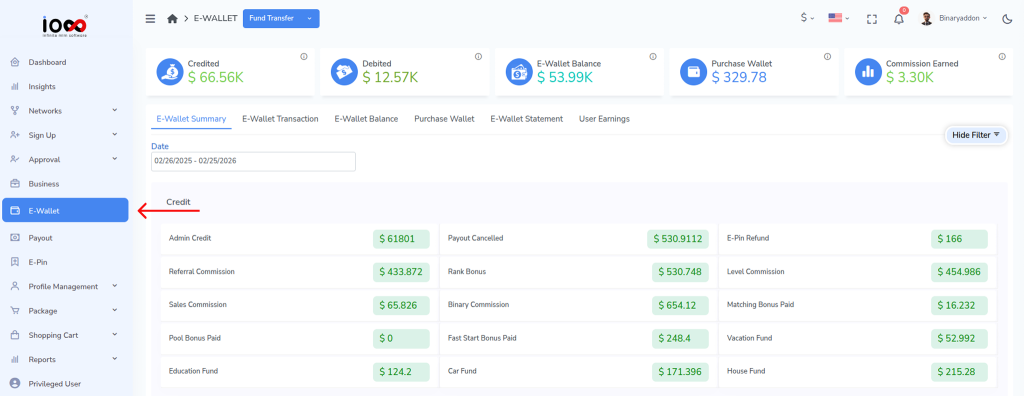
Step 2: Open the Purchase Wallet Section
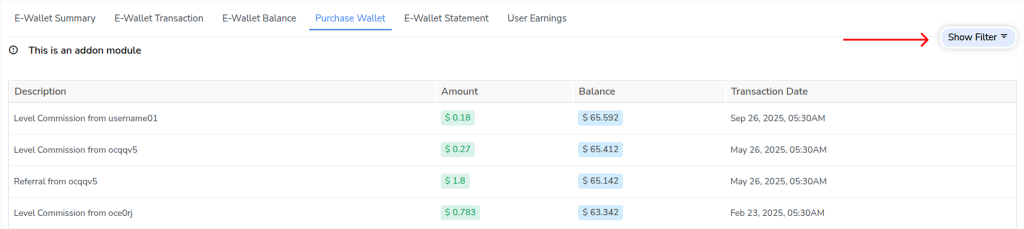
Click Purchase Wallet to access purchase-related wallet records.

Step 3: Open the Filter Panel
Click Show Filter to display the search options.
Step 4: Enter the Username
In the Username field, enter the username of the user whose purchase wallet details you want to view.
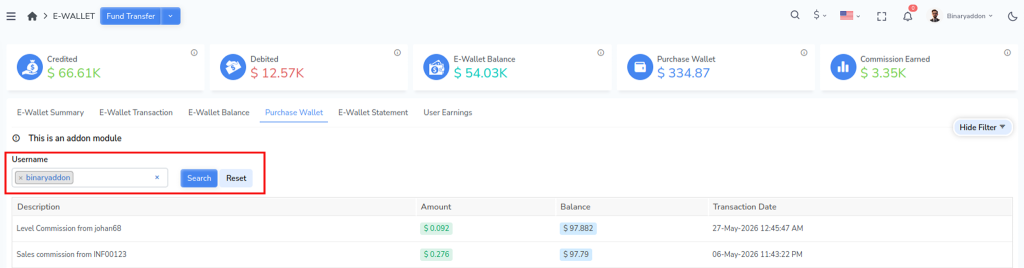
Step 5: Search for Purchase Wallet Details
Click Search. The system will display the purchase wallet details and related purchase transactions for the selected user.
Result
Administrators can easily review purchase-related wallet activities for a specific user, helping maintain accurate records of purchase transactions and wallet usage within the system.