
The E-Wallet Summary provides a consolidated overview of wallet activity across the entire system. It helps administrators monitor the overall flow of funds by displaying the total amounts credited and debited within a selected period. This section also offers category-wise transaction data, making it easier to analyze wallet activity and financial trends.
Purpose
Use the E-Wallet Summary page to:
- Monitor overall wallet activity across the platform
- View total credited and debited amounts
- Analyze category-wise wallet transactions
- Review financial activity for a specific date range
- Gain quick insights into system-wide wallet movements
Information Displayed
The E-Wallet Summary displays:
- Total amount credited
- Total amount debited
- Category-wise credit values
- Category-wise debit values
The displayed information can be filtered based on a selected date range.
Steps to View an E-Wallet Summary
Step 1: Open the E-Wallet Module
From the left-side navigation menu, click E-Wallet.
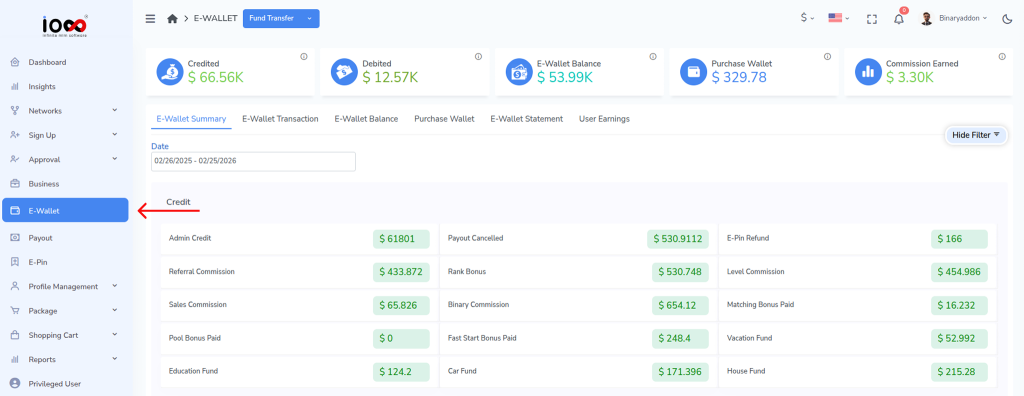
You will see the following sections:
- E-Wallet Summary
- E-Wallet Transactions
- E-Wallet Balance
- Purchase Wallet
- E-Wallet Statement
- User Earnings
Step 2: Open the E-Wallet Summary
Click E-Wallet Summary to access the summary page.

Step 3: Open the Filter Panel
Click Show Filter to display the available filtering options.

Step 4: Select the Date Range
Choose the required date range to view wallet activity for a specific period.

Step 5: Review the Summary
The system will display the overall wallet activity, including:
- Total credited amount
- Total debited amount
- Category-wise credit details
- Category-wise debit details
Review the information to analyze fund movements and wallet transactions across the platform.
Result
The E-Wallet Summary provides a clear snapshot of the system’s financial activity, helping administrators monitor credits, debits, and category-wise wallet transactions efficiently.